

We saw what an XDP program is in part one: it can be used to load balance packets.
In this part, I will show you how to create an XDP program that load balance ICMP packets. We’ll do that using the Rust Aya framework.
Follow the guide!
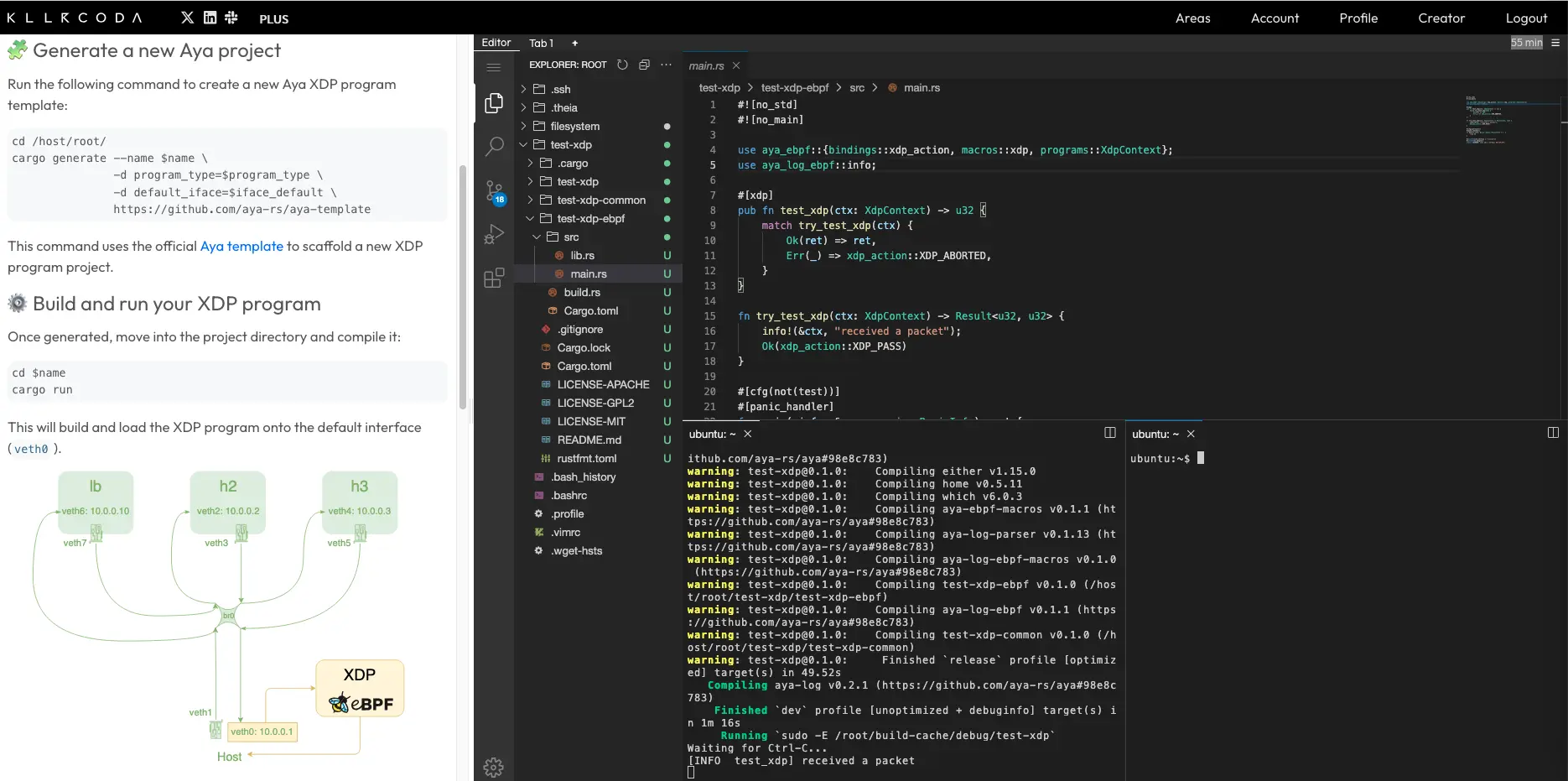
I assume you are already in an environment for developing with Aya. If not, you can use the Killercoda lab:
What Shall We Do Now?#
ICMP Load Balancer#
We are going to create an ICMP (Internet Control Message Protocol) load balancer. So when we ping the load balancer, we are actually pinging another server called the backend.

Let’s briefly review how the ICMP protocol works. The client sends an echo request ICMP packet to a server. The server responds with another ICMP packet of the echo reply type.
To learn more about ICMP, you can visit this page.
Why not TCP or UDP?#
It’s true that an ICMP load balancer may not seem particularly useful. However, I think it’s the best place to start because it’s the easiest to create. Furthermore, most of the concepts we’ll be discussing in this article will still be useful for these load balancers.
As a guide, here is the order of difficulty in my opinion:
- ICMP load balancer
- UDP load balancer
- TCP load balancer
Let’s naively create the load balancer#
Setting up the dev environment#
As we saw in the first part, I suggest installing namespaces:
git clone https://github.com/littlejo/eunomia.dev
cd eunomia.dev/docs/tutorials/42-xdp-loadbalancer/
./setup.sh
Let’s recall what this generated:

We will create an XDP load balancer at the veth6 interface level that will distribute the load between h2 and h3. We will change the destination address in XDP from 10.0.0.10 to 10.0.0.2 or 10.0.0.3:

This is called DNAT (Destination Network Address Translation).
To start with, we will redirect network packets only to h2 (10.0.0.2), which would look like this:

Creating the XDP Hello World#
Let’s generate the Aya program:
cargo generate --name lb-xdp \
               -d program_type=xdp \
               -d default_iface=veth6 \
               https://github.com/aya-rs/aya-template
cd lb-xdp/
In anticipation, we will use additional crates:
- network-types for Rust structures of level 1, 2, and 3 headers;
- blog-xdp, the crate from this blog, so we don’t have to copy/paste previously written helper functions.
So let’s modify the lb-xdp-ebpf/Cargo.toml file and add the following to the dependencies section:
network-types = "0.1.0"
blog-xdp = { git = "https://github.com/littlejo/blog-xdp" }
Let’s build the hello world program:
cargo buildLet’s test it quickly:
ip netns exec lb cargo runWe run ping -c1 10.0.0.10, which returns received a packet on the cargo run side.
Keeping only pings#
Now, we’re going to modify the Aya program on the kernel side: lb-xdp-ebpf/src/main.rs. We’re going to retrieve only the ICMP packets.

We have already written similar code in a previous episode, so here are the results of the changes:
use network_types::{
    eth::{EthHdr, EtherType},
    ip::{Ipv4Hdr, IpProto},
    icmp::IcmpHdr,
};
use blog_xdp::helper::ptr_at;

#[inline(always)]
fn filter_icmp(ctx: &XdpContext) -> Option<(*const Ipv4Hdr, *const IcmpHdr)> {
    let ethhdr: *const EthHdr = ptr_at(ctx, 0).ok()?;

    match unsafe { (*ethhdr).ether_type() } {
            Ok(EtherType::Ipv4) => {}
            _ => return None,
        }

    let ipv4hdr: *const Ipv4Hdr = ptr_at(ctx, EthHdr::LEN).ok()? ;
    let icmphdr: *const IcmpHdr = ptr_at(&ctx, EthHdr::LEN + Ipv4Hdr::LEN).ok()? ;

    match unsafe { (*ipv4hdr).proto } {
         IpProto::Icmp => {}
         _ => return None,
    }

    Some((ipv4hdr, icmphdr))
}

fn try_lb_xdp(ctx: XdpContext) -> Result<u32, u32> {
    let (ipv4hdr, icmphdr) = match filter_icmp(&ctx) {
        Some(x) => x,
        None => return Ok(xdp_action::XDP_PASS),
    };
    let dst_addr = unsafe { (*ipv4hdr).dst_addr };
    let src_addr = unsafe { (*ipv4hdr).src_addr };

    info!(&ctx,
        "src={:i}, dst={:i}", src_addr, dst_addr);
    Ok(xdp_action::XDP_PASS)
}
The message of type: src=10.0.0.1, dst=10.0.0.10 is displayed only when an ICMP packet is sent. This is where we will develop the load balancer.
Let’s check:
ip netns exec lb cargo runOn another terminal, let’s ping the future load balancer:
ping -c 2 10.0.0.10On the cargo run terminal, the following is then displayed:
[INFO  lb_xdp] src=10.0.0.1, dst=10.0.0.10
[INFO  lb_xdp] src=10.0.0.1, dst=10.0.0.10
Feel free to test other protocols to verify that nothing is displayed.
Improving logs#
To better understand how this load balancer will work, it is useful to display a little more detail about the received packet.
Let’s look at the contents of an ICMP header:

- Type: the type of ICMP request (
8corresponds to echo request and0corresponds to echo reply) - Code: the code specifies the type (not useful for echo request and echo reply)
- Checksum: for packet integrity
To retrieve these elements, we can use the network-types crate.
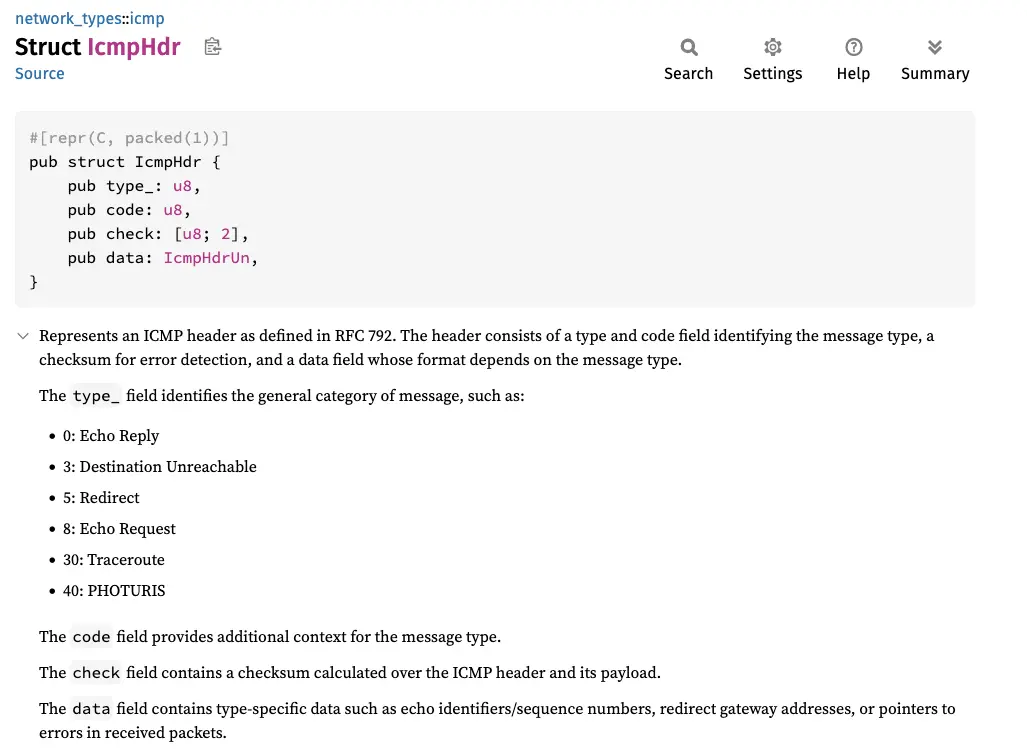
So to get the ICMP packet type, you can do it this way:
let type_ = unsafe { (*icmphdr).type_ };Let’s create a function dedicated to logs:
#[inline(always)]
fn log_icmp(ctx: &XdpContext, ipv4hdr: *const Ipv4Hdr, icmphdr: *const IcmpHdr) {
    let type_ = unsafe { (*icmphdr).type_ };
    let dst_addr = unsafe { (*ipv4hdr).dst_addr };
    let src_addr = unsafe { (*ipv4hdr).src_addr };

    info!(ctx,
        "src={:i} dst={:i} ({})", src_addr, dst_addr, type_);
}
The main code becomes:
fn try_lb_xdp(ctx: XdpContext) -> Result<u32, u32> {
    let (ipv4hdr, icmphdr) = match filter_icmp(&ctx) {
        Some(x) => x,
        None => return Ok(xdp_action::XDP_PASS),
    };
    log_icmp(&ctx, ipv4hdr, icmphdr); //MODIFY
    Ok(xdp_action::XDP_PASS)
}
Let’s start ip netns exec lb cargo run again and then ping:
[INFO lb_xdp] src=10.0.0.1 dst=10.0.0.10 (8)We can now verify that the ICMP packet is indeed an echo request (8).

veth7. It would be reversed: the source IP would be 10.0.0.10 and the destination IP 10.0.0.1. The ICMP packet would then be of type echo reply (0).Changing the destination IP#
This is where it gets interesting. Remember that the goal is to achieve the following first:
We therefore need to replace the destination address with 10.0.0.2:
let backend_ip = [10, 0, 0, 2];
unsafe {
    (*ipv4hdr).dst_addr = backend_ip;
}
This is not possible because the variable ipv4hdr is not mutable. We therefore need to replace const with mut:
let ipv4hdr: *const Ipv4Hdr = ptr_at(&ctx, EthHdr::LEN)? ;The function ptr_at returns a Result<*const T, u16>. We could recreate an almost identical function but with Result<*mut T, u16> as the return value. But there is a more appropriate
way by taking the original function and casting the type:
#[inline(always)]
fn ptr_at_mut<T>(ctx: &XdpContext, offset: usize) -> Result<*mut T, u16> {
    let ptr = ptr_at::<T>(ctx, offset)?;
    Ok(ptr as *mut T)
}
We then end up with the following main code:
#[inline(always)]
fn filter_icmp(ctx: &XdpContext) -> Option<(*mut Ipv4Hdr, *const IcmpHdr)> { //MODIFY
    let ethhdr: *const EthHdr = ptr_at(ctx, 0).ok()?;

    match unsafe { (*ethhdr).ether_type() } {
            Ok(EtherType::Ipv4) => {}
            _ => return None,
        }

    let ipv4hdr: *mut Ipv4Hdr = ptr_at_mut(ctx, EthHdr::LEN).ok()? ; //MODIFY
    let icmphdr: *const IcmpHdr = ptr_at(&ctx, EthHdr::LEN + Ipv4Hdr::LEN).ok()? ;

    match unsafe { (*ipv4hdr).proto } {
         IpProto::Icmp => {}
         _ => return None,
    }

    Some((ipv4hdr, icmphdr))
}

fn try_lb_xdp(ctx: XdpContext) -> Result<u32, u32> {
    let (ipv4hdr, icmphdr) = match filter_icmp(&ctx) {
        Some(x) => x,
        None => return Ok(xdp_action::XDP_PASS),
    };
    let backend_ip = [10, 0, 0, 2]; //ADD
    unsafe { //ADD
        (*ipv4hdr).dst_addr = backend_ip; //ADD
    } //ADD

    log_icmp(&ctx, ipv4hdr, icmphdr);
    Ok(xdp_action::XDP_PASS)
}
Let’s test the compilation and installation of the eBPF program:
ip netns exec lb cargo runNo problem.
Let’s test the ping:
ping -c 2 10.0.0.10In cargo run, we can clearly see the packets with the new destination:
[INFO  lb_xdp] src=10.0.0.1 dst=10.0.0.2 (8)
[INFO  lb_xdp] src=10.0.0.1 dst=10.0.0.2 (8)
BUT it no longer pings:
PING 10.0.0.10 (10.0.0.10) 56(84) bytes of data.

--- 10.0.0.10 ping statistics ---
2 packets transmitted, 0 received, 100% packet loss, time 1006ms
We seem both close to the goal and far from it. Let’s see where the problem might be coming from.
Let’s fix the bug#
Debugging#
When we have a network problem, we often use a very handy tool: tcpdump
ip netns exec lb tcpdump -l -i veth6 icmp -vvLet’s re-run the ping commands.
And let’s see what tcpdump gives us:
tcpdump: listening on veth6, link-type EN10MB (Ethernet), snapshot length 262144 bytes
23:22:36.133053 IP (tos 0x0, ttl 64, id 526, offset 0, flags [DF], proto ICMP (1), length 84, bad cksum 2491 (->2499)!)
    10.0.0.1 > 10.0.0.2: ICMP echo request, id 165, seq 1, length 64
23:22:37.193765 IP (tos 0x0, ttl 64, id 1495, offset 0, flags [DF], proto ICMP (1), length 84, bad cksum 20c8 (->20d0)!)
    10.0.0.1 > 10.0.0.2: ICMP echo request, id 165, seq 2, length 64
Don’t see anything? Look closely at the end of the lines, you’ll see something like: bad cksum 2491 (->2499)!. cksum is an abbreviation of checksum.
Maybe the checksum is usually bad too? Let’s check. Let’s stop the XDP program and see what tcpdump shows:
23:27:18.896834 IP (tos 0x0, ttl 64, id 64521, offset 0, flags [DF], proto ICMP (1), length 84)
    10.0.0.1 > 10.0.0.10: ICMP echo request, id 166, seq 1, length 64
23:27:18.896911 IP (tos 0x0, ttl 64, id 28797, offset 0, flags [none], proto ICMP (1), length 84)
    10.0.0.10 > 10.0.0.1: ICMP echo reply, id 166, seq 1, length 64
We see a classic trace of echo request ⟺ reply with ping. And, most importantly, we no longer see any checksum problems.
This is actually quite logical: a checksum is used to verify the integrity of a packet. If we modify an element of a packet, the checksum will no longer be valid and the operating system will reject the packet.
Which checksums?#
So, all we need to do is modify the checksum to restore the packet’s integrity? Yes, but if I look at the different headers, there isn’t just one:
- Level 1 (
EthHdr): there is no checksum
- Level 2 (
Ipv4Hdr): there is a checksum
- Level 2.5 (
IcmpHdr): there is also a checksum
So which one (or perhaps which ones) is missing?
To answer this question, we need to know how the checksum is calculated for IPv4 and ICMP headers.
IPv4 checksum#
There is a dedicated Wikipedia page devoted to the IPv4 checksum:
The Internet checksum, also called the IPv4 header checksum, is a checksum used in version 4 of the Internet Protocol (IPv4) to detect corruption in the header of IPv4 packets. Since
Since we have modified a parameter (the destination IP) in the IPv4 packet header (Ipv4Hdr), the checksum is now invalid.
ICMP checksum#
It remains to be seen whether the ICMP checksum uses the IPv4 header for its calculation. This is less common.
I read RFC 792 (just the part about the checksum, don’t worry):
The checksum is the 16-bit ones’s complement of the one’s complement sum of the ICMP message starting with the ICMP Type. For computing the checksum, the checksum field should be zero. This checksum may be replaced in the future.
In summary, the checksum is calculated based on the ICMP message, i.e., the ICMP header (IcmpHdr) and the payload:
Therefore, modifying the IPv4 header does not change the ICMP checksum.
Let’s recalculate the checksum#
The calculation of a checksum could be the subject of an entire article. There are different methods for calculating it. I wrote a function in the blog-xdp crate to recalculate the checksum of the IP header. The iph_csum() function is easy to use. We modify
elements of the IP header and then calculate the checksum with this function, which gives the following for an IP change:
unsafe {
    (*ipv4hdr).dst_addr = backend_ip;
    let chksum = iph_csum(ipv4hdr);
    (*ipv4hdr).set_checksum(chksum);
}
We used the set_checksum() function from the network-types crate to update the new checksum
of the IP header:

The main code becomes:
use blog_xdp::helper::iph_csum; //ADD

fn try_lb_xdp(ctx: XdpContext) -> Result<u32, u32> {
    let (ipv4hdr, icmphdr) = match filter_icmp(&ctx) {
        Some(x) => x,
        None => return Ok(xdp_action::XDP_PASS),
    };
    let backend_ip = [10, 0, 0, 2];
    unsafe {
        (*ipv4hdr).dst_addr = backend_ip;
        let chksum = iph_csum(ipv4hdr); //ADD
        (*ipv4hdr).set_checksum(chksum); //ADD
    }

    log_icmp(&ctx, ipv4hdr, icmphdr);
    Ok(xdp_action::XDP_PASS)
}
Let’s test the code:
ip netns exec lb cargo runOn another terminal:
ping -c2 10.0.0.10We then see:
PING 10.0.0.10 (10.0.0.10) 56(84) bytes of data.
64 bytes from 10.0.0.2: icmp_seq=1 ttl=64 time=0.582 ms (DIFFERENT ADDRESS!)
64 bytes from 10.0.0.2: icmp_seq=2 ttl=64 time=0.591 ms (DIFFERENT ADDRESS!)
We can see that the client detects that the IP address responding is not the one it is pinging.
In a “real” load balancer, this would not be sufficient: we would also have to change the destination MAC address. We can of course retrieve this element manually for testing purposes, but doing so automatically is a different matter entirely.
To do this, we would need to create a small user program that sends ARP requests to fill an eBPF map with an IP => MAC correspondence.
Load balancing across multiple IPs#
To load balance across multiple IPs, we can use the eBPF random function:
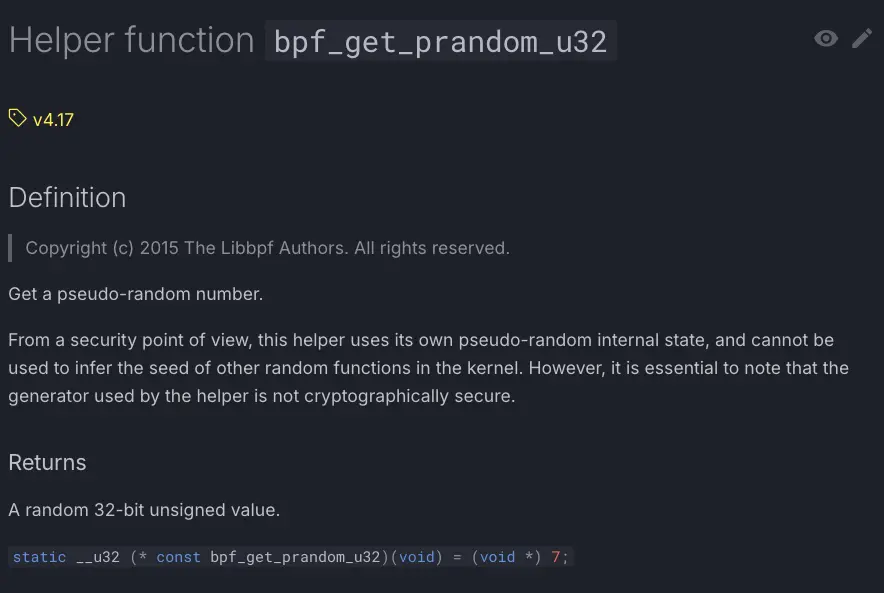
This function returns a pseudo-random 32-bit unsigned number. In our case, we need to vary between two IPs: 10.0.0.2 and 10.0.0.3, which are actually
4-byte arrays. So we just need to vary the last value of the array between 2 and 3.
How do we do this in Rust?
First, we need to import the random function:
use aya_ebpf::helpers::bpf_get_prandom_u32;And add this to vary the two IPs:
let backend_index = unsafe { bpf_get_prandom_u32() % 2 + 2 };
let backend_ip = [10, 0, 0, backend_index as u8];
We end up with:
PING 10.0.0.10 (10.0.0.10) 56(84) bytes of data.
64 bytes from 10.0.0.3: icmp_seq=1 ttl=64 time=0.088 ms (DIFFERENT ADDRESS!)
64 bytes from 10.0.0.2: icmp_seq=2 ttl=64 time=0.098 ms (DIFFERENT ADDRESS!)
64 bytes from 10.0.0.3: icmp_seq=3 ttl=64 time=0.082 ms (DIFFERENT ADDRESS!)
64 bytes from 10.0.0.2: icmp_seq=4 ttl=64 time=0.088 ms (DIFFERENT ADDRESS!)
64 bytes from 10.0.0.2: icmp_seq=5 ttl=64 time=0.081 ms (DIFFERENT ADDRESS!)To make the code readable, we will create a dedicated function for DNAT:
use aya_ebpf::helpers::bpf_get_prandom_u32;

#[inline(always)]
fn lb_dnat(ipv4hdr: *mut Ipv4Hdr) {
    let backend_index = unsafe { bpf_get_prandom_u32() % 2 + 2 };
    let backend_ip = [10, 0, 0, backend_index as u8];

    unsafe {
        (*ipv4hdr).dst_addr = backend_ip;
        let chksum = iph_csum(ipv4hdr);
        (*ipv4hdr).set_checksum(chksum);
    }
}
The main code then becomes:
fn try_lb_xdp(ctx: XdpContext) -> Result<u32, u32> {
    let (ipv4hdr, icmphdr) = match filter_icmp(&ctx) {
        Some(x) => x,
        None => return Ok(xdp_action::XDP_PASS),
    };

    lb_dnat(ipv4hdr);

    log_icmp(&ctx, ipv4hdr, icmphdr);
    Ok(xdp_action::XDP_PASS)
}
This episode is now complete! We have seen the basics of creating an XDP load balancer: IP change and checksum.
But this (DIFFERENT ADDRESS!) is still weird… I’ve never seen that before!
In the next episode, we’ll improve this XDP load balancer so that the ping doesn’t notice anything!